 Hamster Server
Apache and PHP on Windows, no config files.
Hamster Server is a free, portable local web server for Windows. It bundles Apache 2.4 and PHP 8.2–8.5 with a control panel that writes every configuration file for you, keeps PHP on the latest patch on its own, and tells you exactly which program is in the way when a port is taken.
Unzip. Start. Open.
No services to install and no files to edit. The control panel generates Apache's configuration, every site's configuration and each PHP version's php.ini.
Unzip
Extract the folder anywhere you can write to, such as D:\HamsterServer, and run HamsterServer.exe.
Start All
One button starts Apache and PHP. The tray icon turns green when everything is running.
Open your site
Visit http://localhost/, or add your project as shop.localhost with a framework preset.
Everything a PHP project needs on Windows.
Set it up in proper windows instead of text files. Every change is validated and applied for you.
Four PHP versions, side by side
PHP 8.2, 8.3, 8.4 and 8.5 are included. Switch with one click, or install any other official Windows release from php.net, verified with SHA-256.
PHP that updates itself
New patches of your PHP branch are installed next to the current one and switched on while nothing is being served. Your extensions come along, and the previous patch stays for rollback.
Framework-ready sites
Virtual hosts pick the public folder, route through the front controller and block files like .env.
Port conflicts, explained
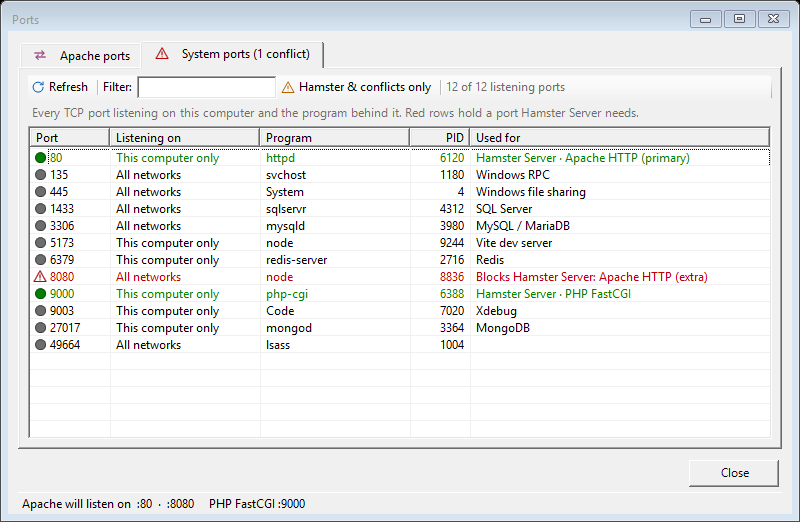
See every port open on your PC and the program behind it. The one blocking Apache is marked in red.
Looks after itself
PHP is restarted after a crash, and its memory is reclaimed while idle, so no request is ever cut off.
PHP settings in one place
Memory limit, upload size, time zone and extensions, with a recommended profile that loads in every PHP version.
Apache, tuned and checked
Gzip, Brotli, static-asset caching and HTTPS. Custom directives are tested with httpd -t before they are saved.
Lives in the tray
Start with Windows, start the services on launch, and follow Apache and PHP logs in one coloured pane.
PHP keeps itself current.
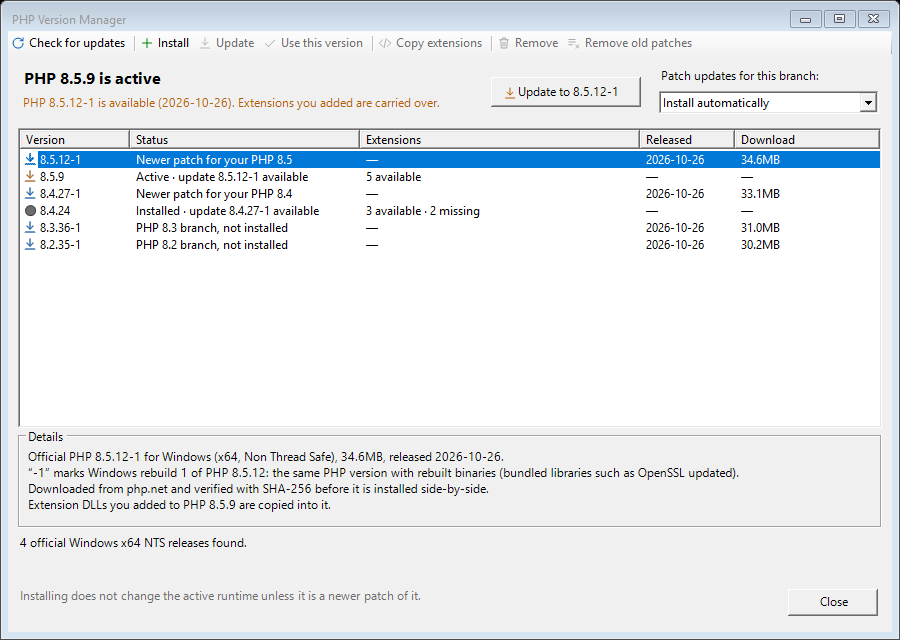
Hamster Server checks php.net a minute after it starts and every six hours. When a newer patch of the branch you use appears, such as 8.5.9 → 8.5.12-1, it takes care of the rest.
Installed side by side
The new patch goes next to the current one and becomes active while nothing is being served. The old one stays, so you can switch back.
Extensions come along
DLLs you added, such as php_sqlsrv.dll or Xdebug, are copied into the new patch. Files it already ships are never overwritten.
Safe and in your control
Only official php.net builds whose SHA-256 checksum matches. Moving to a new branch is always your call. Choose Install automatically, Notify me only or Off.
“Port already in use” — by whom?
The Ports window lists every TCP port listening on your computer, with its address, program and PID. It also says, for each of Apache's ports, whether it is free before you press Start.
Know your services
MySQL, SQL Server, Redis, MongoDB, Vite and Xdebug are named, so an unfamiliar number means something.
Act on it
Filter, sort and refresh. Right-click to open the site in a browser, open the program's folder or copy its details.
Every project under its own name.
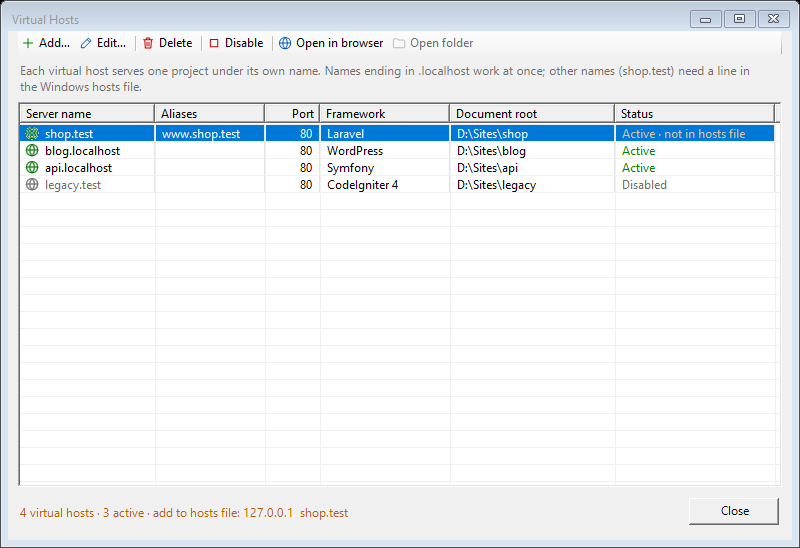
Add a site, pick its folder and a framework preset, and Hamster Server restarts Apache for you. You can enable or disable sites, open them in the browser or open their folder.
Names ending in .localhost work straight away. For any other name, Hamster Server checks the Windows hosts file and shows the exact line to add:
Local by design.
A development server should not be a door into your computer, or a reporter on what you do with it.
This computer only
Apache listens on 127.0.0.1. Opening it to your network is a separate, explicit switch.
One outside connection
Only php.net, over HTTPS, to check for and download PHP. No telemetry. Turn updates off and nothing goes online.
Everything in one folder
Settings, logs, generated configuration and PHP versions stay inside the Hamster Server folder.
Reads, never writes
The hosts file is read to warn you about missing names, never changed. No administrator rights needed.
Included in version 1.4.0
Official builds, recorded with their checksums in the repository's THIRD_PARTY_RUNTIMES.md.
| Component | Build | Version |
|---|---|---|
| Apache HTTP Server | Apache Lounge, VS18 Win64 | 2.4.68 |
| PHP | Non Thread Safe, x64 | 8.2.33 · 8.3.33 · 8.4.24 · 8.5.9 |
| CA certificate bundle | Mozilla roots | 2026-08-13 |

Get Hamster Server
Free and open source. Portable: extract it, run it, delete the folder to remove it.
Download v1.4.0HamsterServer-1.4.0-win-x64.zip · 155 MB- Download the .zip above.
- Extract it to a folder you can write to, for example
D:\HamsterServer. - Run
HamsterServer.exeand press Start All. - Open
http://localhost/.
Requires Windows 10 or 11 (x64) and the .NET 10 Desktop Runtime.
Questions, answered.
What is Hamster Server?
Hamster Server is a free, open-source local web server for Windows. It bundles Apache HTTP Server and PHP 8.2 to 8.5 with a control panel that generates all configuration, so PHP projects run at http://localhost/ or under names like shop.test without editing httpd.conf or php.ini.
Is Hamster Server free?
Yes. Hamster Server is free and its source code is released under the MIT License. The bundled Apache and PHP builds keep their own open-source licenses.
Which PHP versions does it include?
Version 1.4.0 includes PHP 8.2.33, 8.3.33, 8.4.24 and 8.5.9 (Non Thread Safe, x64). Any other official Windows release can be installed from php.net in the PHP Version Manager, and the active branch is moved to its newest patch automatically unless updates are turned off.
Does it update PHP automatically?
Yes, by default. It checks php.net a minute after it starts and every six hours, installs a newer patch of the PHP branch in use next to the current one, and switches to it while no request is running. Updates can be set to notify only, or turned off. It never moves to another PHP branch on its own.
Will extensions such as sqlsrv or Xdebug survive a PHP update?
Yes. Extension DLLs added to a runtime's ext folder, and the DLLs they depend on, are copied into the new patch of the same PHP branch. Files the new patch already ships are never overwritten. Extensions are not copied across branches (for example 8.4 to 8.5) because they are built per branch.
Does it need an installer or administrator rights?
No. It is a portable folder: extract the zip to a writable location and run HamsterServer.exe. It needs Windows 10 or 11 (x64) and the .NET 10 Desktop Runtime.
Does it include MySQL or MariaDB?
No. Hamster Server bundles Apache and PHP. PHP's MySQL, PostgreSQL, SQLite and SQL Server extensions can connect to a database server you run separately; the Ports window shows which database servers are listening.
Why does my virtual host name not open in the browser?
Windows has to know the name points at this computer. Names ending in .localhost work immediately; any other name needs a line such as 127.0.0.1 shop.test in the Windows hosts file. Hamster Server checks the hosts file and shows the exact line to add.
What does it connect to on the internet?
Only windows.php.net and downloads.php.net over HTTPS, to check for and download PHP releases, which are installed only when their SHA-256 checksum matches. Setting updates to Off stops even that. Apache listens on this computer only unless LAN access is enabled.